

Ricoh Gen5 Printhead Cables: 40P, 50P and Power-Cable Ordering Checks

Choose a Ricoh Gen5 cable by its exact connection, contact count, connector geometry, wiring and required length. “40P,” “50P” and “power cable” identify different ordering choices. None is a universal replacement for every printer using a Gen5 head.
This guide helps printer owners, buyers and service teams turn an old cable or parts request into a specific order. It covers the current UVINKPRO signal-cable and power-cable listings, including the red adapter options grouped on the latter page.
First Identify Which Cable You Need
40P or 50P signal cable
Match both socket ends, the documented contact count, connector spacing, orientation and approved wiring. Then choose the required routed length.
55CM power-cable option
Compare the green connectors, branch arrangement and terminal details. Wire color alone cannot establish the electrical assignments.
Red 50CM or 70CM cable
Identify the two ports it connects. Its place in a power-cable listing does not make it the same item as the 55CM harness.
The Page Title Does Not Describe Every Variant
The signal-cable page title mentions 40P and 50 cm, but its current menu includes several choices. The power-cable page also groups multiple cable types. Use the exact selected option in your inquiry and order.
| Option group | Listed choices | Ordering check |
|---|---|---|
| Signal ribbon | 40P: 50, 60 or 70CM | Confirm a 40-position assembly and the correct connector at each end. |
| Signal ribbon | 50P: 50, 60 or 70CM; also 30P 50CM | Do not substitute a different count because the length matches. |
| Power harness | Printhead Power Cable – 55CM | Confirm the complete harness, connector layout and pin assignment. |
| Other options on the power page | Red Adapter Cable – 50CM / 70CM; 40P / 50P Gray Flat Cable – 70CM | These are separate choices, not accessories automatically bundled with the power harness. |
For example, a request for “40P 50CM” should not become “50P 50CM” merely because the latter appears first in the menu. Recheck the option beside the price and in the cart before submitting the order.
“40P” and “50P” here are contact-count labels, not performance grades. A 50-position cable is not an upgrade for a 40-position port. Never leave positions unmatched, trim a connector or force a larger housing into a smaller socket.
A Flat Cable Is Not Always an Exposed-Tail FFC
The current signal-cable photographs show ribbon assemblies terminated in black socket housings. That construction differs from a flexible flat cable with exposed contact fingers inserted directly into a small board connector.
TE Connectivity's ribbon-cable selection guide separates connector centerline, position count, rows and termination details. These are independent checks. The guide is background on connector selection, not evidence that the store cables contain TE connectors or use a particular pitch.
Get the total positions, number of rows, contact center spacing and connector part reference. Do not estimate them from an oblique thumbnail.
Photograph each end straight on, including keys, blocked positions, notches, latches and strain relief. Include the matching board header.
Record the original orientation and board port labels. Confirm the pin-to-pin mapping from machine documentation; an edge stripe alone is insufficient.
Provide printer model, head code, board model and revision, cable markings and the service part number where available.
A housing that mates mechanically can still have the wrong wiring. Ask the technician or machine supplier to confirm the assembly before purchase, rather than using a powered trial to settle an uncertain match.
The Power Harness Needs Its Own Identification Record
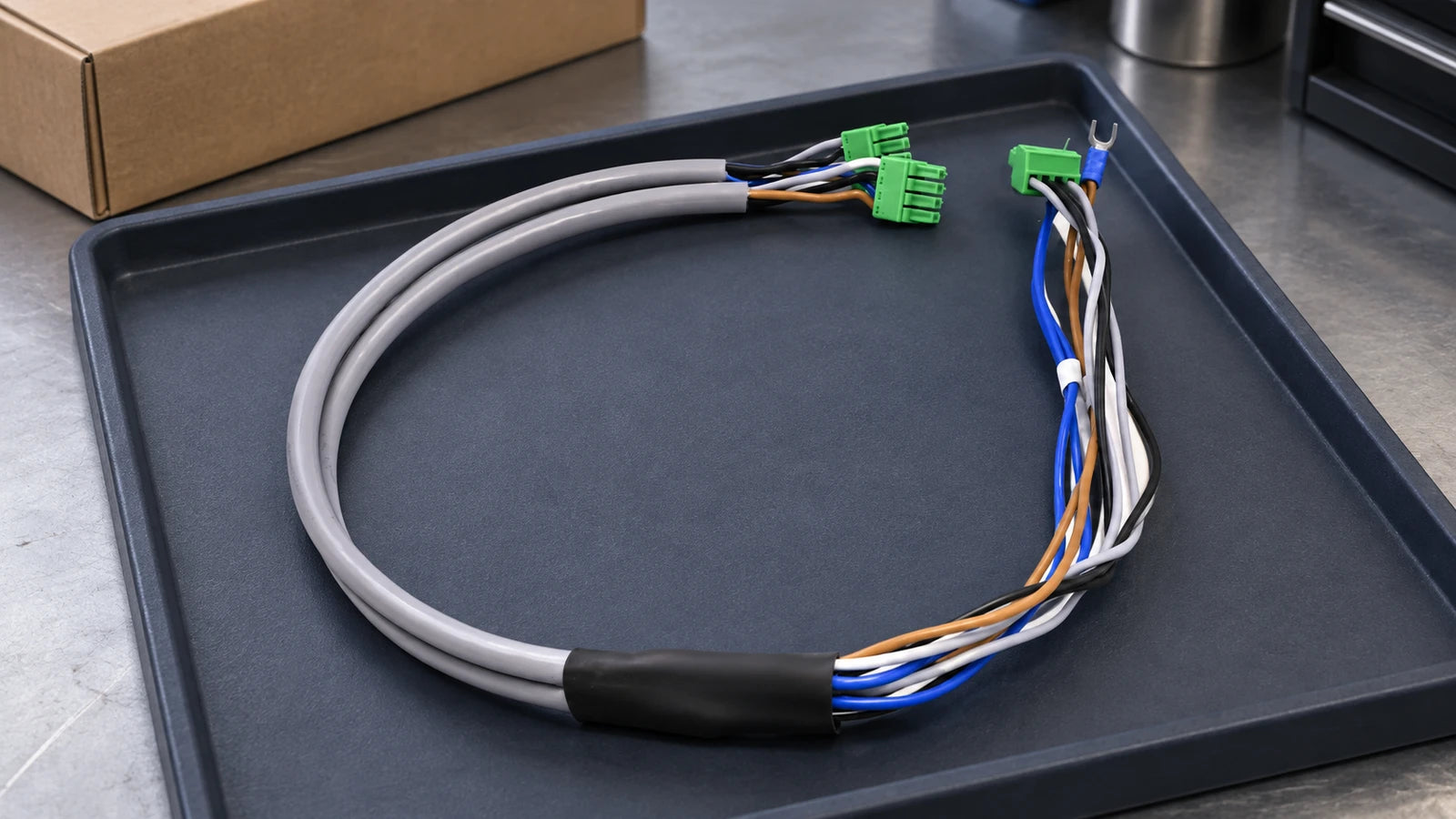
The 55CM option's actual store photo shows a gray harness, colored conductors, green connector housings and a fork terminal. Confirm the required branch arrangement and terminal functions with the machine's wiring information. Do not infer power, ground or polarity from a photograph or wire color.
- Identify the source and destination board ports and their labels.
- Confirm the full connector references and pin assignments for the exact printer configuration.
- Request the applicable electrical ratings and construction details for the supplied assembly.
- Confirm what is included: one harness, an adapter, or another separately selected item.
The page's broad voltage wording is not a setting recommendation for your printer. This guide provides no operating-voltage or pinout instruction for an unverified harness.
Measure the Cable Assembly, Not a Different Specification
Ask how the seller measures length: between connector reference points, along the cable, or across the complete assembly. Record the approved route and service-loop allowance without stretching the old cable; a longer option is not automatically a suitable substitute.
For comparison, Ricoh's MH5420 / MH5440 page states a standard total length of 248 mm including cables. That head specification is not the length of every separate printer-side ribbon or power harness. Keep the head assembly and the cable being ordered clearly identified.
If the head itself is uncertain, start with the Gen5 versus Gen5i identification guide. A family nickname cannot establish the required cable assembly.
Keep the Red Adapter Separate from the Power Harness

When ordering the red adapter, specify 50CM or 70CM and provide the original cable and port photos. A familiar-looking connector does not establish that a generic computer cable will work in the printer.
On arrival, compare the selected option, both ends, keys, markings, length and visible condition with the confirmed order. Keep the old cable and order photos until the replacement has been checked. Report a mismatch before modifying or connecting the new item.
Review the Exact Cable Options
These four cards link to specific available options on two active product pages. Images are the actual option photographs; the signal-cable specification discrepancy above still requires confirmation. These are compatible replacement listings, not a claim of original Ricoh manufacture or universal fit.

40P Signal Cable · 50CM
Match the 40-position requirement, both housings and wiring. Confirm the actual connector spacing before ordering.
Review 40P 50CM
50P Signal Cable · 50CM
A separate contact-count option. Verify the assembly against the printer's board and cable reference.
Review 50P 50CM
Power Harness · 55CM
Confirm all branches, connector references and pin assignments. The photo does not establish voltage or polarity.
Review 55CM Power Harness
Red Adapter Cable · 50CM
Confirm both destination ports and the required wiring. This option is separate from the 55CM power harness.
Review Red Adapter 50CMSend the Cable Evidence Before Payment
Send UVINKPRO support your printer model, full head code, board model and revision, photos of both cable ends and matching ports, old cable markings, required length and selected option. Include the fault message if replacing a suspected failed cable, and request written confirmation of the supplied assembly.
Frequently Asked Questions
Can a 50P cable replace a 40P cable?
Do not substitute them. Match the documented contact count, connector geometry and wiring; equal length does not make them interchangeable.
Is the listed 0.5mm pitch confirmed by the photographs?
No. The description and socket-ended gallery require clarification. Ask for the actual connector specification and current photos of the selected option.
Does the 55CM power option include a red adapter?
The menu lists the power harness and red adapters separately. Confirm the contents of the exact option; do not assume a bundle from the page title.
Can I order 70CM instead of 50CM for extra reach?
Only after the printer supplier confirms the assembly and route are suitable. Length is one requirement alongside wiring, connectors and the machine's approved cable arrangement.
Will a new cable fix a head-not-detected error?
Not necessarily. Cable, connector, board and head issues need machine-specific diagnosis. Provide the error history and do not swap connections while powered.
Reference and Supply Notes
Store options and manufacturer references checked October 26, 2026. TE's guide supports general connector-selection principles; Ricoh's page describes the named head family. Neither certifies the store cable's connector brand, pinout or machine compatibility. Request the actual supplied-item details before purchase.