

FH-3 Ink Pump: Supply Pump or Suction Pump—Which Option Do You Need?
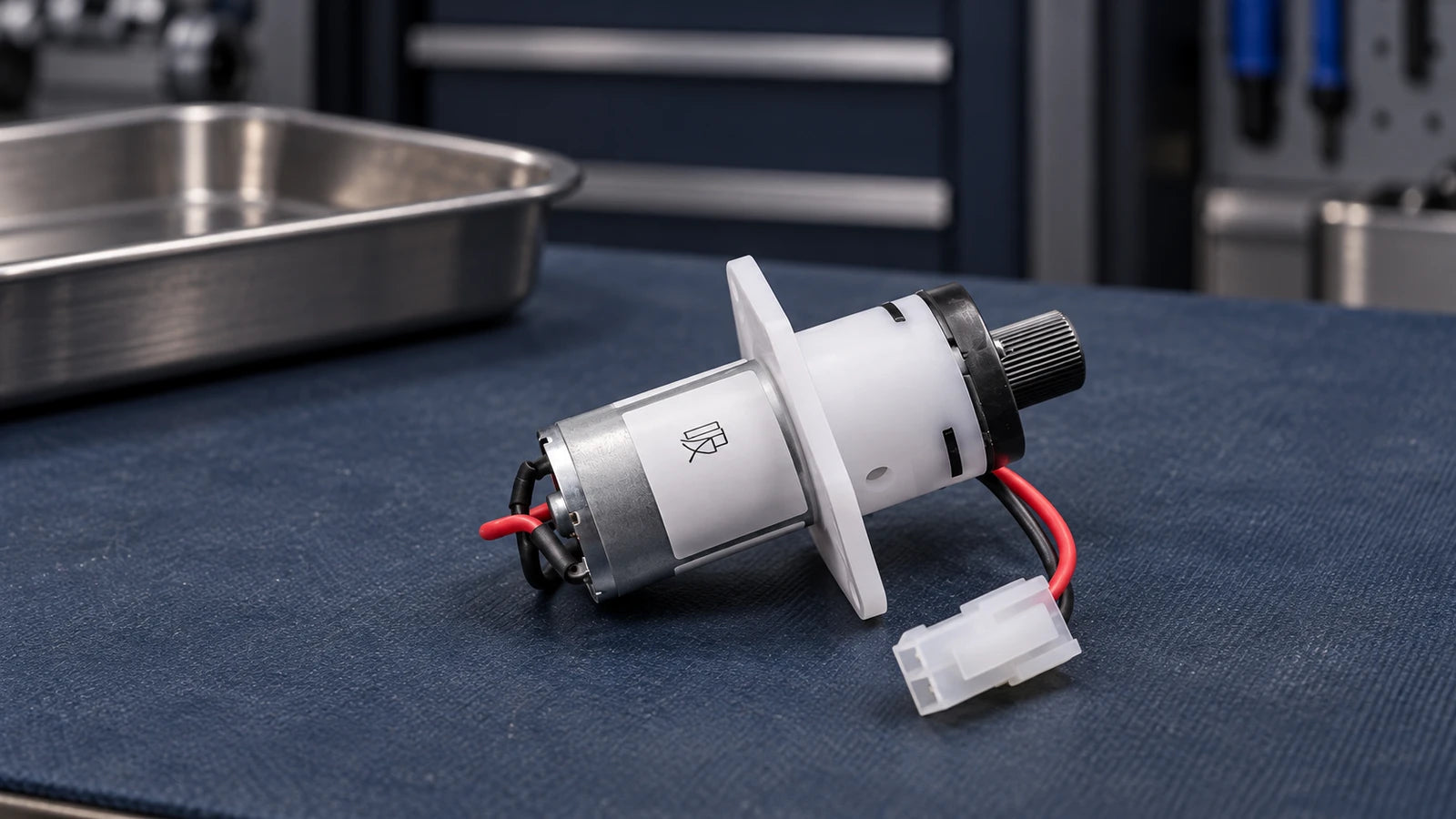
Choose the FH-3 option by the original pump's documented role: Supply Pump for a matched ink-feeding application, or Suction Pump for a matched extraction or maintenance application. The option name is only the first check. Confirm electrical requirements, fluid compatibility, ports and mounting before ordering either version.
The UVINKPRO FH-3 listing has two separately selectable options that look very similar. This guide helps printer owners, technicians and purchasing teams turn an old-part photo into a precise order. It does not establish that FH-3 fits every UV, solvent or DTF printer.
Which FH-3 Option Should You Investigate?
The original part feeds ink
If the service documentation identifies the old part as an ink-transfer or supply pump, investigate the Supply Pump option and confirm its specifications against that route.
The original part serves maintenance
If the documented function is extraction or cleaning suction, investigate the Suction Pump option. Verify whether the pump handles liquid or air in that particular system.
The role is still unknown
A small motor, two ports or a cleaning problem is not enough to choose. Keep the old part and request identification using its label, machine model and route photos.
Trace the Documented Route Before Selecting an Option
Every pump has an inlet and an outlet. The store's “Supply Pump” and “Suction Pump” names describe the offered applications; they do not mean that one pump only pushes and the other only pulls. Nor do they establish that reversing wires or swapping hoses converts one version into the other.
Inkjet machines can use separate pumps for transfer, circulation, vacuum control and maintenance. KNF's drop-on-demand system example illustrates several such roles within one ink system. That example explains why function matters; it is not an FH-3 installation diagram.
- Record the printer's full model and the complete old-pump label.
- Use the machine's parts diagram or service instructions to identify the pump's role.
- Photograph the existing route and mounting position before any authorized removal.
- Record whether the pump runs during refill, circulation or a maintenance command, if this is already known.
Do not identify the role solely from a nozzle dropout or weak cleaning result. If the fault is still unresolved, use the ink-circulation troubleshooting guide or the waste-ink path guide before buying parts.
“FH-3” and a Similar Plug Are Not a Complete Specification

The current FH-3 listing distinguishes the two options but does not provide a complete, verified specification sheet for each. Ask for confirmation for the exact option being supplied. Do not copy a voltage, flow or pressure figure from another seller's FH-3 page and assume it describes this unit.
Confirm rated voltage, polarity, current or power requirement, control method and permitted duty. Match connector keying and pin assignment, not just its white plastic shell.
Identify the ink or maintenance fluid and whether the pump contacts liquid or handles air. Confirm wetted-material compatibility and the required flow, pressure or vacuum under the machine's operating conditions.
Check documented inlet/outlet direction, port shape, hose dimensions and connection method. Record tubing inner and outer diameter; a similar-looking fitting may seal differently.
Compare flange shape, fixing-hole spacing, body envelope, orientation and lead length. Check space for the connected tubing without tight bends or strain.
Thomas's inkjet pump guidance identifies flow stability, ink chemistry and viscosity as important application requirements. Those general requirements support checking more than physical fit; they do not certify either FH-3 option for a specific printer.
Send the Option Name Along with the Photos
Write FH-3 — Supply Pump or FH-3 — Suction Pump in the inquiry only after the role is identified. If it is unknown, say so. A useful inquiry includes the following evidence in one message:
- Machine: printer brand, full model, printhead code and current ink system.
- Old part: readable label, all sides, connector face and mounting photos.
- Application: confirmed route, fluid or air handled, symptom and recent service history.
- Fitment: electrical requirements, tube dimensions and measured fixing points.
- Supply scope: requested option and quantity; ask which lead, plug, fittings or mounting accessories are included.
The two options appear on one product page. Check the selected option again before adding it to the cart, and confirm the same option appears in the cart and order confirmation. The listing title alone does not identify the version you selected.
Compare the Delivered Pump Before Connecting It

- Photograph the delivered pump and packaging identification before opening fluid connections.
- Compare its label, selected version, ports, connector and mounting with the written confirmation.
- Resolve missing or different details with the seller before fitting, rewiring or adapting anything.
- Have installation and commissioning follow the exact printer's service procedure; retain the old part and order records.
A correct order still needs a correct diagnosis. If the same problem remains after approved installation, record the result and request service assessment rather than assuming a second pump purchase is the next step.
Review the Two FH-3 Options
These cards show the actual store photos assigned to the two variants of the same listing. Use them to compare the exact options after diagnosis; ordering a pump does not establish that it will resolve the fault. Price and availability are shown on the product page.

FH-3 — Suction Pump
For review against a documented extraction or maintenance role. Confirm media, electrical requirements, ports and exact supplied configuration.
Review Suction Pump Option
FH-3 — Supply Pump
For review against a documented ink-feeding role. Confirm operating requirements and fitment; the name alone does not establish continuous-duty suitability.
Review Supply Pump OptionConfirm the Version Before Ordering
Send your printer model, old-pump label, connector and route photos to UVINKPRO support. Ask for the exact FH-3 option, required specifications and included components to be confirmed together.
Frequently Asked Questions
Are the FH-3 Supply Pump and Suction Pump interchangeable?
Do not assume so. They are separate store options, and the listing does not establish that their electrical, fluid or operating requirements are identical.
Can I turn the supply version into the suction version by reversing the wires?
No such conversion is confirmed for these products. Do not reverse polarity or swap hoses as an experiment; use the specified version and the machine's documented connections.
Does weak cleaning suction mean I need the Suction Pump option?
It identifies a maintenance-system symptom, not a confirmed part failure. The cap seal, tubing, restrictions and control state may also need assessment before a replacement is selected.
Will either FH-3 option fit any UV or DTF printer?
No universal fitment is established. Match the exact printer configuration, original pump and fluid requirements rather than buying by the printer category.
What if the old pump label is unreadable?
Send all-side photos, connector details, mounting and tube measurements, and the printer's parts reference if available. Request identification before ordering; appearance alone is insufficient.
Product and Reference Notes
Options and variant photos checked October 9, 2026. KNF and Thomas explain general inkjet pump applications; neither source is an FH-3 specification or compatibility approval. Use the current service documentation for your exact machine.